
Last updated on
Nov 9, 2026
Purchase Order Form 35 1996-2026 free printable template
We are not affiliated with any brand or entity on this form

Fill out
Complete the form online in a simple drag-and-drop editor.

eSign
Add your legally binding signature or send the form for signing.

Share
Share the form via a link, letting anyone fill it out from any device.

Export
Download, print, email, or move the form to your cloud storage.
Why pdfFiller is the best tool for your documents and forms


End-to-end document management
From editing and signing to collaboration and tracking, pdfFiller has everything you need to get your documents done quickly and efficiently.
Accessible from anywhere
pdfFiller is fully cloud-based. This means you can edit, sign, and share documents from anywhere using your computer, smartphone, or tablet.
Secure and compliant
pdfFiller lets you securely manage documents following global laws like ESIGN, CCPA, and GDPR. It's also HIPAA and SOC 2 compliant.
What is Purchase Order Form 35
The Purchase Order Form is a business document used by companies to request goods or services from suppliers.
pdfFiller scores top ratings on review platforms




Who needs Purchase Order Form 35?
Explore how professionals across industries use pdfFiller.

Purchase Order Form 35 is needed by:
-
Business Owners
-
Procurement Managers
-
Accounts Payable Departments
-
Office Administrators
-
Supply Chain Coordinators
-
Freelancers and Contractors
Comprehensive Guide to Purchase Order Form 35
What is a Purchase Order Form?
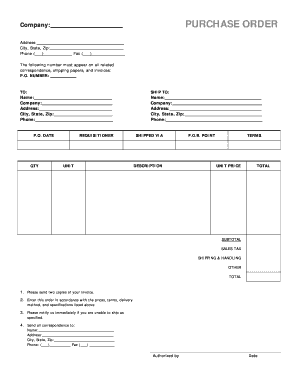
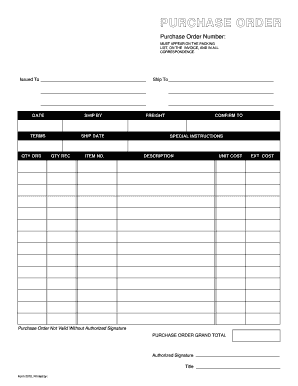
A purchase order form is a crucial document that facilitates the buying process by detailing the terms of a transaction between a buyer and a supplier. This form typically includes essential information such as the purchase order number, date, and shipping details, ensuring clarity and efficiency in business transactions.
Key components of the purchase order form encompass the purchase order number, order date, terms of sale, and shipping instructions. An authorized signature is often required to validate the order, providing legal protection for both parties involved.
Purpose and Benefits of Using a Purchase Order Form
Utilizing a purchase order form streamlines the procurement process, significantly reducing the risk of errors and misunderstandings during transactions. This form acts as a key tool for businesses, offering legal protection by clearly outlining the terms of the agreement between buyers and suppliers.
Moreover, a business purchase order enhances tracking and record-keeping, paving the way for improved inventory management and financial oversight.
Key Features of the Purchase Order Form
A purchase order form template boasts several essential features that facilitate seamless transactions. These features typically include:
-
P.O. number for easy identification
-
Date of order placement
-
Quantity of items ordered
-
Unit price for each item
-
Total amount due
-
Authorized signature field for validation
pdfFiller’s cloud-based features allow users to edit and sign documents easily, coupled with secure digital storage for enhanced management of purchase orders.
Who Should Use a Purchase Order Form?
A diverse range of professionals and organizations benefit from utilizing purchase order forms. Key users include business owners, procurement officers, and authorized signatories, particularly in industries such as retail and manufacturing.
Clear contractual agreements are essential in scenarios involving bulk purchases or recurring orders, making the purchase order form indispensable for these transactions.
How to Fill Out the Purchase Order Form Online: A Step-by-Step Guide
To ensure accuracy when completing the purchase order form online using pdfFiller, follow these straightforward steps:
-
Enter the P.O. number in the designated field.
-
Fill in the date of the order.
-
Specify the quantity of items required.
-
Input the unit price for each item.
-
Calculate and enter the total amount due.
-
Provide the authorized signature to validate the order.
Check each entry meticulously to avoid common mistakes, ensuring all necessary details are accurately recorded.
Common Errors to Avoid When Completing a Purchase Order Form
Awareness of typical mistakes can greatly enhance the effectiveness of the purchase order process. Common errors include:
-
Incorrectly specifying quantities or pricing, which can lead to disputes.
-
Omitting signatures, causing delays in processing.
-
Failing to include essential shipping and contact information.
How to Submit the Purchase Order Form
Submitting the purchase order form can be accomplished through several methods, including:
-
Emailing the form directly to the supplier.
-
Faxing the completed form.
-
Uploading the document directly to supplier systems for processing.
Understanding the subsequent steps for tracking the order post-submission and noting deadlines for timely delivery can contribute significantly to successful procurement.
Security Measures for Handling Purchase Orders
When handling purchase order forms, it is crucial to prioritize security. pdfFiller employs robust security features such as 256-bit encryption, ensuring compliance with regulations including SOC 2 Type II, HIPAA, and GDPR.
Best practices for safeguarding sensitive information involve using secure platforms for storage and transmission of purchase orders, reducing the potential for data breaches.
Example of a Completed Purchase Order Form
Examining a completed purchase order form can enhance understanding of its structure and significance. The filled-out sample should highlight each section, explaining the function of fields such as the P.O. number, quantities ordered, and total amounts.
Referring to this example while filling out your own purchase order can enhance accuracy and clarity in document preparation.
Get Started with Your Purchase Order Form on pdfFiller
Leverage the capabilities of pdfFiller to efficiently complete and manage your purchase order forms. Users can easily edit text, eSign documents, and store them securely in the cloud.
Access the platform from any device without the need for downloads, streamlining the process to enhance overall business efficiency.
How to fill out the Purchase Order Form 35
-
1.To access the Purchase Order Form on pdfFiller, start by navigating to the pdfFiller website. Use the search bar to locate the Purchase Order Form template or enter the URL directly if you have it.
-
2.Once you have found the form, click on it to open the document in the pdfFiller editor. The interface is user-friendly, allowing you to see the form fields clearly laid out.
-
3.Before you begin filling out the form, gather all necessary information, including your purchase order number, date, quantities, unit prices, and shipping details. Having this information handy will streamline your filling process.
-
4.Begin filling in the fields, starting with the 'P.O. NUMBER' and 'DATE' sections. Click inside each field and type in the relevant information. Utilize the toolbar for adding checkboxes or additional notes if required.
-
5.Next, enter the quantities and unit prices for each item you are ordering. Ensure to double-check the amounts to avoid errors.
-
6.Fill out the 'AUTHORIZED SIGNATURE' section. If you are the authorized signatory, click on the field to sign electronically or use the signing tool to create your signature.
-
7.Once you have completed all necessary fields, review the entire form for accuracy. Make sure all information is complete and correct, as this will be referenced in invoices and shipping documents.
-
8.After you've reviewed the form, click on the 'Save' button to store your changes. You may download the completed form for your records or to send it to others.
-
9.If required, you can also submit the form directly through pdfFiller by entering the email addresses of recipients and choosing the submission options within the interface.

Who is eligible to use the Purchase Order Form?
Any business or individual needing to order goods or services from a supplier can use the Purchase Order Form. It's particularly useful for authorized signatories within a company.
Are there deadlines for submitting a Purchase Order?
While there are no strict deadlines for submitting a Purchase Order Form, it is advisable to submit it as soon as the need arises to avoid delays in the procurement process.
How do I submit the completed Purchase Order Form?
You can submit the completed Purchase Order Form via email to your supplier or use the built-in submission features on pdfFiller to send it directly to the necessary recipients.
What supporting documents are required with the Purchase Order?
Typically, you may need to attach any relevant contractual agreements or prior correspondence with the supplier. Verify specific requirements with the supplier for completeness.
What are common mistakes to avoid when filling out the form?
Common mistakes include leaving fields blank, incorrect quantities, or failing to sign the form. Always review your entries before finalizing to ensure accuracy.
What is the processing time for a Purchase Order?
The processing time can vary depending on the supplier. Typically, a Purchase Order is processed within a few business days, but this can depend on item availability and supplier policies.
Can I edit the Purchase Order after submission?
Once submitted, the Purchase Order should not be altered without contacting the supplier. If changes are necessary, it may be best to issue a new Purchase Order or an amendment.
Related Forms

Related Catalogs
Get the latest insights from our blog


If you believe that this page should be taken down, please follow our DMCA take down process
here
.
This form may include fields for payment information. Data entered in these fields is not covered by PCI DSS compliance.